Retail & Trading
零售与贸易
Manage daily sales, product information and stock movements with a more organised POS workflow. 让日常销售、商品资料与库存管理更有条理,协助员工更顺畅地处理日常交易。
{{ 'fb_in_app_browser_popup.desc' | translate }} {{ 'fb_in_app_browser_popup.copy_link' | translate }}
{{ 'in_app_browser_popup.desc' | translate }}
COMSENSE SDN BHD · AUTOCOUNT POS
A Smarter Point-of-Sale Solution for Your Business
Simplify daily sales, speed up checkout and manage your business more efficiently with AutoCount POS, supported by Comsense Sdn Bhd.
使用 AutoCount POS,让日常销售更简单、结账更快捷、业务管理更高效。Comsense Sdn Bhd 为您提供相关支持。
Local Software Support · 本地软件支持
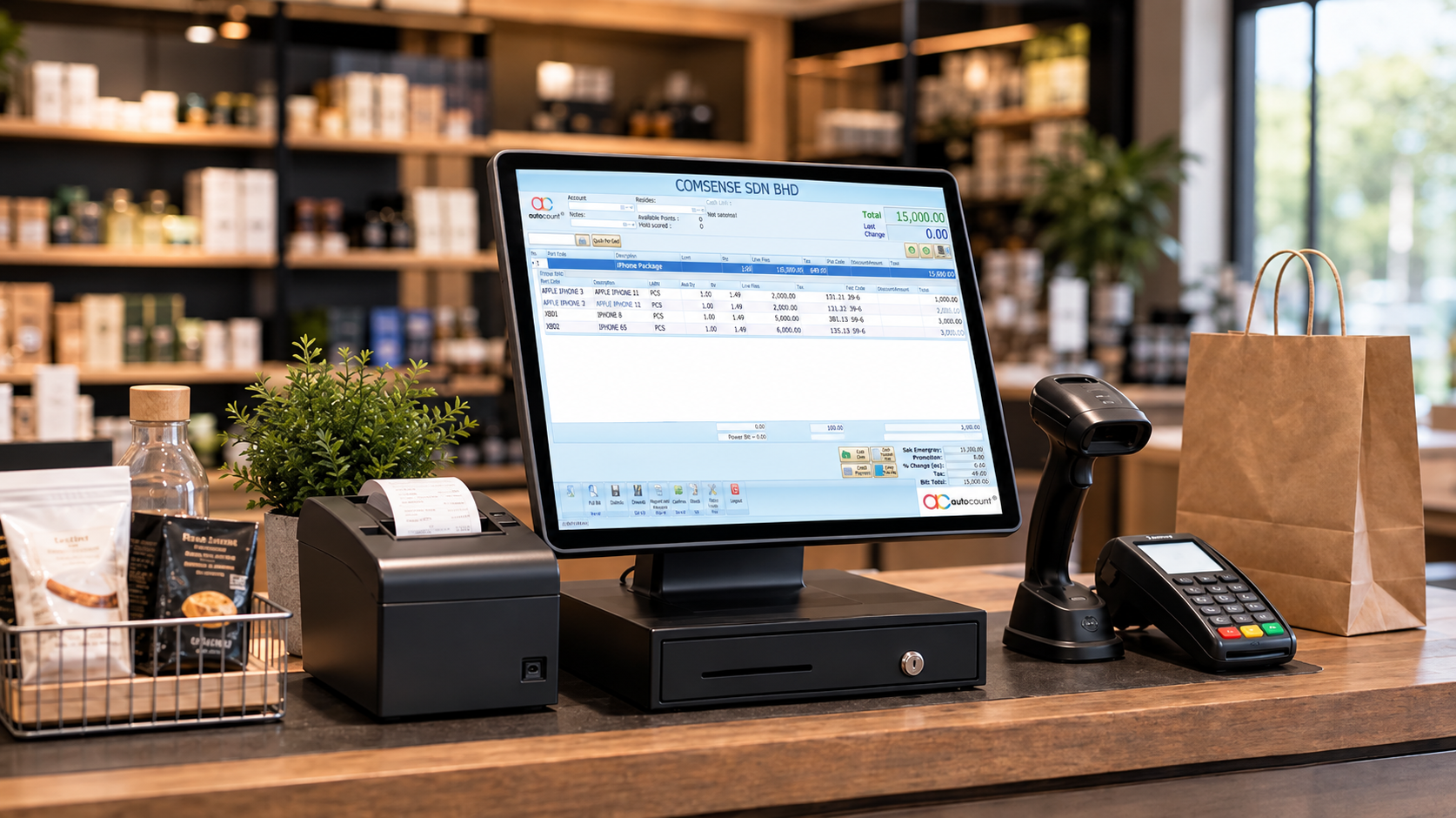
From daily sales to inventory and accounting, AutoCount POS helps
bring essential business operations together.
从日常销售到库存与会计管理,让重要业务流程更紧密地衔接。
Handle SST-related POS transactions with accounting integration designed to support compliant tax processing. Access tax codes and review POS transactions by tax code through Accounting 2.0.
通过与会计系统的整合,协助处理 POS 的 SST 相关交易。 配合 Accounting 2.0 的税码及交易报表,让税务记录更容易查阅与管理。

Connect outlet sales with your accounting workflow. Posting POS transactions to Accounting 2.0 helps your team prepare financial reports with less manual coordination between separate systems.
将各门店的 POS 销售与会计流程连接起来,减少不同系统之间 的手动衔接,让财务报表整理更有条理。

Keep posting organised with date-range and outlet selection, daily posting summaries and access to source documents. Configure posting accounts for different payment methods and other supported transaction entries.
可按日期范围和门店安排过账,查看每日过账摘要,并追溯原始单据。 也能根据不同付款方式及相关交易项目设置过账科目。

Bring point-of-sale activities together with purchase and sales workflows, analysis reports and accounting modules. Customisable documents and numbering help support your business processes.
将 POS、采购、销售及相关会计模块衔接起来,并配合分析报表、 可自定义单据与编号设置,支持日常业务管理。

Keep stock information organised with tools for stock availability, replenishment, costing and pricing, supported by inventory analysis and reporting.
库存管理功能还涵盖:
帮助企业更有条理地管理商品资料、库存状态及仓库相关流程。

Access Accounting 2.0 through supported mobile devices with AutoCount On The Go. Businesses using AOTG can also use the Self-Ordering feature to make routine orders from headquarters more convenient.
使用 AutoCount On The Go,可通过支持的移动设备访问 Accounting 2.0。符合使用条件的企业也可通过 Self-Ordering 功能,更方便地向总部进行日常下单。
Practical POS Solutions, Backed by Local Support
实用的 POS 解决方案,配合 Comsense 本地专业支持。
AUTOCOUNT POS · BUSINESS SOLUTIONS
Designed to support everyday sales and business operations across different industries. 协助不同行业更有条理地处理日常销售与业务营运。
零售与贸易
Manage daily sales, product information and stock movements with a more organised POS workflow. 让日常销售、商品资料与库存管理更有条理,协助员工更顺畅地处理日常交易。
餐饮业
Support everyday checkout and sales recording in cafés, restaurants and other F&B businesses. 协助咖啡馆、餐厅及其他餐饮业处理日常收银与销售记录,让营运流程更清晰。
成长型企业
Connect POS operations with accounting and inventory workflows as your business grows. 随着业务发展,将 POS 营运与会计及库存流程衔接,帮助团队更有系统地管理业务。
Need help choosing the right POS setup?
Comsense Sdn Bhd can help you explore a suitable solution for your business.
不确定哪种 POS 方案适合您的业务?
Comsense Sdn Bhd 可协助您了解适合的解决方案。
让业务系统紧密衔接,日常管理更轻松。
Record daily sales and payments.
记录日常销售与收款。
Connect sales with accounting workflows.
衔接销售记录与会计流程。
Keep stock information organised.
让库存信息更有条理。
Bring your daily sales, accounting and inventory workflows closer together with AutoCount POS. 通过 AutoCount POS,让日常销售、会计与库存管理更紧密衔接。
FLEXIBLE POS FOR EVERY BUSINESS
一套 POS,满足不同业务需求。
From daily checkout to multi-outlet operations, manage your business with greater ease.
从日常收银到多分店营运,帮助您更轻松地管理业务。

01 / MANAGEMENT
多分店集中管理
Manage outlet settings from your head office and bring sales information together for easier business reporting.
在总部管理分店设置,集中汇总销售资料,让营运状况更容易掌握。

02 / SYNCHRONISATION
保持资料同步
Set your synchronisation preferences at head office to help keep information consistent across your outlets.
在总部设定同步规则,帮助各分店维持一致的业务资料。

03 / CONTINUITY
网络中断也能继续营运
Keep sales moving during internet interruptions, with data synchronisation resuming when the connection is restored.
即使网络暂时中断,也能继续处理销售;连接恢复后再同步资料。

04 / STAFF EXPERIENCE
让员工更快上手
A clear, touch-friendly interface and shared shortcut settings help staff learn routine checkout tasks more easily.
清晰的触控操作界面与可共享的快捷键设置,帮助员工更快熟悉日常收银流程。

05 / PAYMENT OPTIONS
灵活的电子钱包支付
Support popular e-wallet payment options through compatible AutoCount POS configurations, giving customers more ways to pay.
通过兼容的 AutoCount POS 配置支持多种热门电子钱包,让顾客拥有更多付款选择。
Built Around the Way Your Business Works.
为不同规模与营运需求的企业,提供更灵活的 POS 管理方式。
Set clear boundaries for daily operations, manage staff permissions and keep important transaction activities traceable. 从员工权限到交易管理,建立清晰的操作规范,让日常营运更容易管理与追踪。
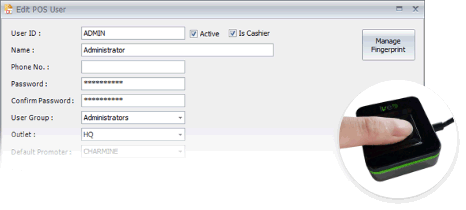
Administrator-level control across HQ and all outlets, with staff login and attendance records visible in daily operation reports — so every counter stays accountable and consistent.
管理员统一掌控总部与所有分店,员工登录与考勤记录可于每日营运报表中查看,让每个柜台的操作更可控、更一致。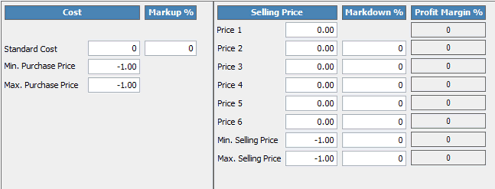
Set minimum selling prices to prevent below-cost sales, limit cashier discounts, and allow supervisor or manager approval for exceptions. The system also alerts users when transaction prices fall outside the set rules.
设定最低售价,避免低于成本销售;限制收银员的折扣幅度,并可要求主管或经理批准例外情况。当交易价格超出设定规则时,系统也会发出警示。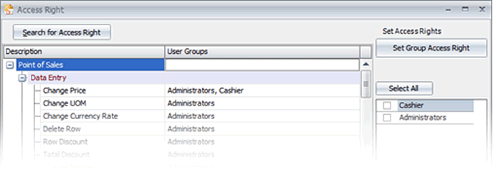
Assign access by staff role or user group with more than 200 access right records and unlimited user creation, so team members only use functions relevant to their duties.
根据员工岗位或用户组分配权限,提供超过 200 项权限记录、用户数量不限,让团队成员只使用与其职责相符的系统功能。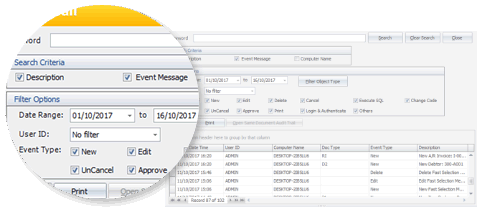
Track who did what, when and where through a searchable audit trail — filter by date range, event type or object type to follow up on deletions, modifications and other activities.
通过可搜索的操作记录追踪“谁在何时何地做了什么”,可按日期范围、事件类型或对象类型筛选,方便查证删除、修改等操作。REPORTING & SALES ANALYSIS
从报表中,掌握更多业务资讯。
Explore sales, payment and profitability reports to review your business transactions and performance.
通过销售、付款与利润相关报表,检视交易记录及业务表现。
01 / CASH REPORTING
现金收款与现金记录报表
Review cash receipts and cash recording information to support daily cash reconciliation.
查看现金收款与现金记录资料,协助日常现金核对。
02 / SESSION & SALES
POS 班次与销售报表
Review POS session records and sales results for clearer daily operational reporting.
查看 POS 班次记录与销售成果,让日常营运报表更清晰。
03 / PAYMENT ANALYSIS
付款方式分析报表
Review payment information across methods such as cards and e-wallets.
分析银行卡、电子钱包等不同付款方式的相关资料。
04 / PROFITABILITY
利润率与多维度销售分析
Examine profit margins and sales data from different analytical perspectives.
从不同分析维度检视利润率与销售资料。
05 / RANKING & TIME
销售排名与时段分析
Compare top- and bottom-ranked sales results and review sales patterns across time periods.
比较销售排名表现,并分析不同时间段的销售情况。
More Insight. Better Business Visibility.
透过多种报表,更清晰地检视业务表现。
Add practical capabilities to support your operations, manage daily transactions and gain better visibility across your business.
Track inventory items using unique serial numbers for easier product identification and record management.
通过独立序列号追踪商品,方便识别产品及管理相关记录。
Organise stock by batch to support structured inventory tracking and product handling.
按商品批次整理库存,让库存追踪及商品管理更有条理。
Group selected items into packages to support bundled products and convenient sales transactions.
将指定商品组合成套装,方便销售组合商品及处理相关交易。
Manage sales orders for transactions requiring preparation, follow-up or fulfilment.
管理需要备货、跟进或安排交付的销售订单,让订单处理更清晰。
Support selected head-office and branch workflows, goods transfers and accounts receivable payment handling.
支援总部与分店相关流程、库存调拨及应收款处理。
Connect POS-related records with accounting workflows to support transaction and financial management.
配合会计工作流程管理 POS 相关记录,提升交易与财务管理的清晰度。
Review sales performance and analyse transaction data to support day-to-day business decisions.
查看销售表现并分析交易数据,为日常营运决策提供参考。
Support your retail or F&B operations with AutoCount POS 5.0 and a streamlined workflow for consolidated B2C e-Invoices.
为零售及餐饮日常交易提供更有条理的电子发票处理流程。
Generate consolidated e-Invoices for eligible business-to-consumer transactions through AutoCount POS 5.0.
通过 AutoCount POS 5.0 处理符合条件的 B2C 综合电子发票。
Customers can scan the QR code on a receipt and provide the required information to request an e-Invoice.
顾客可扫描收据上的 QR Code,填写所需资料并申请电子发票。
Retail and F&B businesses operating across multiple locations can use AutoCount POS to consolidate eligible B2C e-Invoices across outlets.
零售及餐饮企业可利用 AutoCount POS 集中处理多个门店 符合条件的 B2C 综合电子发票。
Available for AutoCount POS 5.0 with the applicable e-Invoice
configuration. Features and workflow may depend on your setup.
适用于配备相关电子发票配置的 AutoCount POS 5.0;
实际功能与流程须视系统配置而定。
CLOUD-BASED eDASHBOARD APP
轻松掌握业务表现
Access key business figures in one convenient dashboard.
通过便捷的仪表板,快速查看重要业务数据。
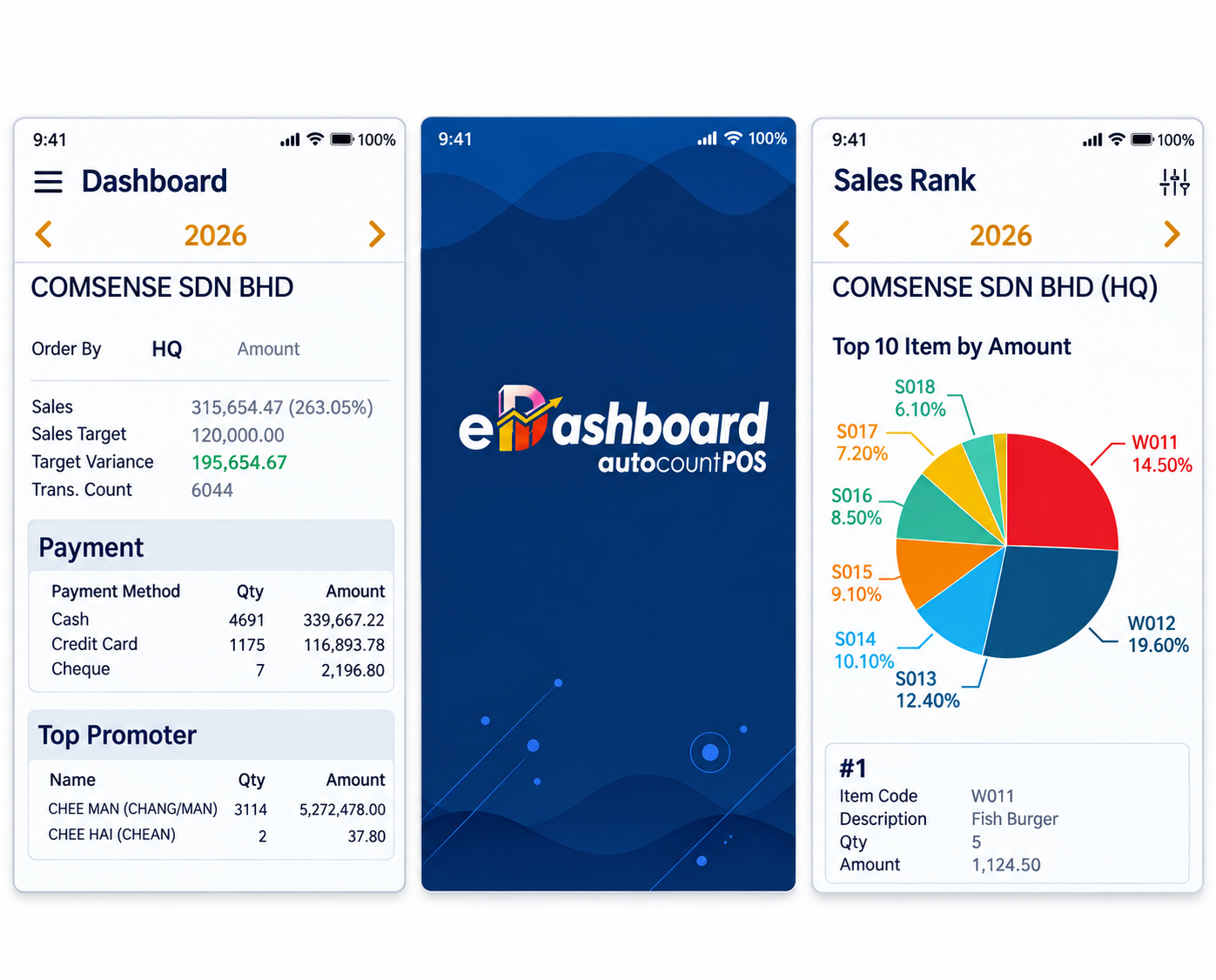
Review sales figures and transaction counts. 查看销售额与交易笔数,了解整体销售表现。
Check sales targets and target variance. 查看销售目标及目标差额,追踪销售进度。
Identify top-performing items by sales amount. 根据销售金额查看商品排名,了解热销商品。
Review payment methods and amounts in the dashboard. 查看不同付款方式的数量与金额,掌握收款情况。
Available functions and displayed data may vary according to the AutoCount POS version, user permissions and system configuration.
实际功能与显示数据可能因 AutoCount POS 版本、用户权限及系统设置而有所不同。
COMSENSE SDN BHD · AUTOCOUNT POS
Let us help you find the right POS solution for your business.
欢迎联系我们,了解适合您业务需求的 AutoCount POS 解决方案。
Local Software Support · 本地软件支持

Your satisfaction will always be our motivation
Accounting · POS · Payroll · E-Invoice



 Level 3A, Sunway Visto Tower, Lingkaran SV, Sunway Velocity, 55100 Kuala Lumpur
  9am – 6pm (Mon–Fri) 9am – 12pm (Sat)

